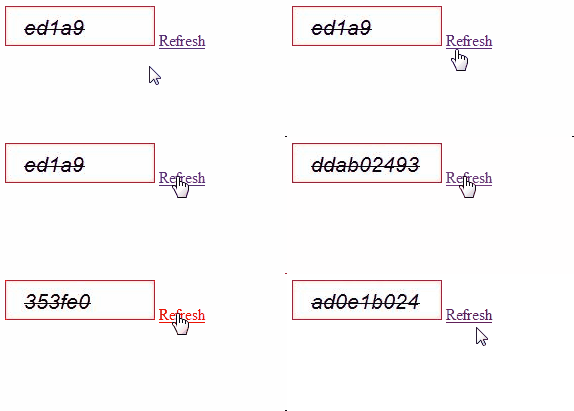
Captcha
Here I will explain how to create captcha in asp.net using c#, vb.net or create captcha with refresh button in asp.net using c#, vb.net.
Default.aspx
<html xmlns="http://www.w3.org/1999/xhtml">
<head runat="server">
<title>Captcha Image with Refresh Button</title>
<script type="text/javascript">
function RefreshCaptcha() {
var img = document.getElementById("imgCaptcha");
img.src = "Handler.ashx?query=" + Math.random();
}
</script>
</head>
<body>
<form id="form1" runat="server">
<div>
<img src="Handler.ashx" id="imgCaptcha" />
<a href="#" onclick="javascript:RefreshCaptcha();">Refresh</a>
</div>
</form>
</body>
</html>
After completion of aspx page design need to add one handler file in your website for that Right click on website -à Select Add New Item -à Select Generic Handler file and give name as Handler.ashx and click ok
Now open Handler.ashx file and write the following code
C# Code
<%@ WebHandler Language="C#" Class="Handler" %>
using System;
using System.Drawing;
using System.Drawing.Imaging;
using System.Web;
public class Handler : IHttpHandler {
public void ProcessRequest (HttpContext context) {
using (Bitmap b = new Bitmap(150, 40, PixelFormat.Format32bppArgb))
{
using (Graphics g = Graphics.FromImage(b))
{
Rectangle rect = new Rectangle(0, 0, 149, 39);
g.FillRectangle(Brushes.White, rect);
// Create string to draw.
Random r = new Random();
int startIndex = r.Next(1, 5);
int length = r.Next(5, 10);
String drawString = Guid.NewGuid().ToString().Replace("-", "0").Substring(startIndex, length);
// Create font and brush.
Font drawFont = new Font("Arial", 16, FontStyle.Italic | FontStyle.Strikeout);
using (SolidBrush drawBrush = new SolidBrush(Color.Black))
{
// Create point for upper-left corner of drawing.
PointF drawPoint = new PointF(15, 10);
// Draw string to screen.
g.DrawRectangle(new Pen(Color.Red, 0), rect);
g.DrawString(drawString, drawFont, drawBrush, drawPoint);
}
b.Save(context.Response.OutputStream, ImageFormat.Jpeg);
context.Response.ContentType = "image/jpeg";
context.Response.End();
}
}
}
public bool IsReusable {
get {
return false;
}
}
}
DEMO: